
FAQs
GENERAL
| What is MoR? |
|---|
| Merchant of Record. The term “merchant of record” refers to the entity that is legally authorized and responsible for processing customer payments—including credit and debit card transactions and digital wallet transactions—for goods or services on behalf of a business. |
| What is SoR? |
|---|
| Seller of Record. The organization in charge of carrying out a sales transaction and supervising the delivery of products or services to the client is known as the Seller of Record (SoR). |
| What is the difference between Product and ProductLine? |
|---|
| Product Line is Brand. Product is a single item sellable item which is part of the catalog and belongs to a ProductLine. |
| What are the supported image sizes ? |
|---|
| The following image sizes are supported for product images. Recommendation is to use MASTER_IMAGE size. |
| Image Size | Height (px) | Width (px) |
|---|---|---|
| XSMALL | 50 | 78 |
| SMALL | 76 | 119 |
| MEDIUM | 92 | 144 |
| LARGE | 153 | 240 |
| XLARGE | 198 | 308 |
| XXL | 442 | 700 |
| XXXL | 1036 | 664 |
| MASTER_IMAGE | 442 | 700 |
| Is there a sample for how to display Instructions on product page? |
|---|
Here is a sample of redemption Instruction type, under "How to Redeem" for a Sephora card on Giftcards.com 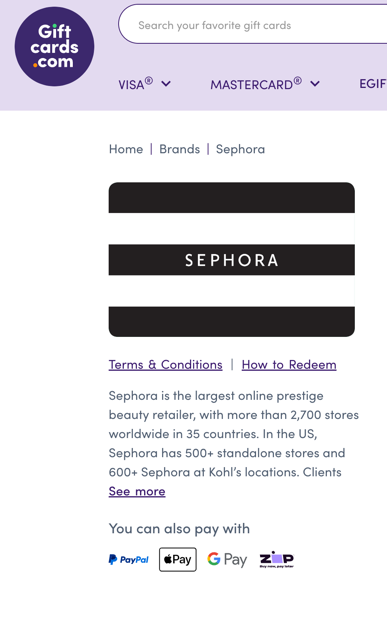 |
| How many currencies can be supported per Product in a Catalog? |
|---|
| Only one currency is supported per product based on product's country. |
| What is the difference between locale and locales? |
|---|
| Locale at Product level represents the default locale of that product. Locales at product level represents the supported locales of the product other than the default locale. There can be multiple locales supported per product. |
| Which product attribute translations are supported in locales? |
|---|
| Name Description termsAndConditions instructions |
| What are the minimum attributes required to place a single eGift Fulfillment Only Use case? |
|---|
| Order level: external_id sender object Order Line level : product_id quantity face value object |
| How can I retrieve eGift URLs in an eGift Fulfillment Only use case? |
|---|
There are two ways to get eGift URLs:
|
| What is scheduled delivery and how do I use it? |
|---|
| Scheduled delivery allows you to schedule egift delivery anywhere from a few hours to up to a year in advance. This feature is available for digital egift deliveries only. To implement scheduled delivery, include the schedule parameter in your delivery object using ISO 8601 format. The minimum scheduling time is 1 hour from the current time. Egifts are delivered at the top of the scheduled hour with a 5-minute processing buffer. Required attributes: "delivery": {<br />"type": "DIGITAL",<br />"email": true, // OR<br />"text": false,<br />"schedule": "2025-11-03T18:30:00.000Z"<br />} Note: You must specify either email or text delivery (at least one must be true). We follow ISO 8601 standards to manage different timezones and support both date and time based scheduled delivery. |
| What order and orderLine statuses can I expect? |
|---|
| The following statuses are supported for orders and order lines. |
| Order Status | Description |
|---|---|
| NEW | The order request was created to go through the order lifecycle |
| PROCESSING | The order is undergoing internal processes of validations. |
| FAILED | The order request failed due to issues such as system errors or system downtime. |
| REJECTED | The order request was rejected due to issues such as invalid requests or product unavailability. |
| CANCELLED | The order was cancelled before fulfillment was complete. |
| COMPLETED | The fulfillment provider successfully generated the card, and the eGift URL was received. |
| OrderLine Status | Description |
|---|---|
| NEW | The orderLine request was created to go through the order lifecycle |
| PROCESSING | The orderLine is undergoing internal processes of validations. |
| FAILED | The orderLine request failed due to issues such as system errors or system downtime. |
| REJECTED | The orderLine request was rejected due to issues such as invalid requests or product unavailability. |
| CANCELLED | The orderLine was cancelled before fulfillment was complete. |
| COMPLETED | The fulfillment provider successfully generated the card, and the eGift URL was received. |
| What delivery statuses can I expect in the GET API response? |
|---|
| The following delivery statuses appear in the GET API response, depending on the delivery method. |
| Status | Description |
|---|---|
| IN-TRANSIT | Cards in the order have been fulfilled and email sent to recipient |
| DELIVERED | The recipient's email domain, ie @gmail.com, has provided a response the card has been delivered |
| RETURNED | The recipient's email domain, ie @gmail.com, has declined to accept the email. The email cannot be sent to this email address and has been added to the blocklist. |
| BOUNCED | The recipient's email domain, ie @gmail.com, has not responded with a Delivered or Returned response. eGift email could be resent via manual intervention from BHN Customer Support |
| DELIVERED_OPEN | The email was read by the recipient |
| DELIVERED_SPAM | The email was delivered to the recipient's SPAM folder |
SMS
| Status | Description |
|---|---|
| IN-TRANSIT | Cards in the order have been fulfilled and SMS is sent to the recipient. |
| DELIVERED | The recipient's SMS domain, has provided a response the card has been delivered |
| FAILED | The outbound message failed to send. This can happen for various reasons including queue overflows, Account suspensions and media errors. |
| UNDELIVERED | The recipient's SMS domain, has provided a response the SMS is not delivered |
| CANCELLED | The message scheduled has been canceled. |
| For orders with BHN as MoR, is caseId bound to the specific order_id or checkout session? |
|---|
Yes. caseId is bound to the specific order_id or checkout session. If the submit call includes a valid caseId with a mismatched order_id, BHN rejects the order. |
| For orders with BHN as MoR, is POST /v3/orders/cart/{order_id}/submit idempotent and safe to retry with the same order_id and caseId? |
|---|
Yes. The submit call is idempotent. Multiple calls with the same external_id (depending on whether external_po_number is also used) return the same response. The response status is PROCESSING for asynchronous partners or COMPLETED for synchronous partners. |
| What are the quantity limits for synchronous ordering? |
|---|
Synchronous ordering supports single-unit orders only. For Partners, BHN's synchronous Ordering APIs are designed and optimized exclusively for single-unit fulfillment ( If you need to fulfill more than one unit, use one of these supported approaches:
Synchronous APIs are optimized for: - low latency |
| What Order API attributes are included in the settlement file? |
|---|
The settlement file includes the following attributes from the Order API and Void request and response: From the order request: |
Updated 4 months ago